
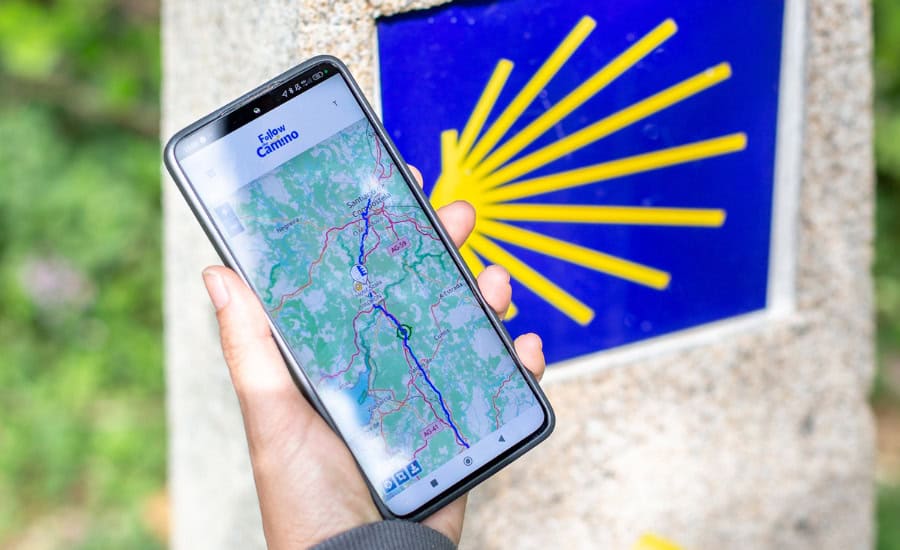
When you book your Camino de Santiago with us, the question we hear most isn’t about the stages or the weather. It’s this one: “How will I know everything’s on track?”
That’s why we built the Follow the Camino app. It’s not a add-on or a nice-to-have extra, it’s the tool we use to give you visibility into your trip from the very beginning, long before you set foot on the Camino, and that keeps you company every single day you walk.
In this article, we’ll walk you through exactly what you can do with it and, something almost nobody tells you upfront, what it can’t do. We’d rather you arrive with clear expectations than get caught off guard mid-stage.
What is the Follow the Camino app
Follow the Camino is the official app that supports you through two distinct moments of your experience:
- Before you leave, while your trip is still being planned.
- During the Camino, once you’re walking stage by stage.
It’s available for Android and iOS, and it’s linked directly to your booking, so everything you see in it matches your exact itinerary, dates and services. It’s not a generic route app, it’s your trip, on your phone.
Download the app:


Before you leave: track your trip from the quote stage
One of the things that gives the most peace of mind to people planning their Camino with us is that they don’t have to wait for the trip to be confirmed before it starts taking shape.
From the moment you receive your quote, you can open the app and see:
- The full detail of your quote, including stages, dates and proposed accommodations.
- The services included in your package (luggage transfer, accommodation, breakfasts, assistance, depending on your itinerary).
- Payment management, so you always know what’s confirmed and what’s still pending.
This means that if you have questions while deciding, you’re not relying on emails alone. You can open the app, review your proposal at your own pace, and come back to it as many times as you need before making your decision.
All your travel documents, in one place
As your trip date gets closer, the anxiety almost always comes from the same question: “Do I have everything I need, or am I missing something?”
To solve that, the app brings together every document related to your Camino in a single section:
- General trip information.
- Your training plan, so you arrive physically prepared.
- Travel guides, with details on each stage and what you’ll find along the way.
- Your day-by-day vouchers, meaning the confirmation for every accommodation and service you’ll use along the route.
No printing, no folders to carry. It’s all wherever you are, and it updates along with your booking.

On the Camino: the map that walks with you every day
This is where the app really proves its worth, once you’re actually walking.
The app includes a map with the official route you need to follow, and on that same map, all your accommodations are marked, stage by stage. That means you don’t have to dig through separate documents to know where you’re headed each day. Just open the app and see, at a glance, the route and where you’ll be sleeping that night.
You can also see your real-time position on that map. For those walking without a companion, or who simply want the certainty of knowing they’re on the right track, this is one of the features our travelers value most.
And while the map is one of the standout features, it’s not the only one. You still have access, within the same app, to your documents, your vouchers and your trip status, all in one place while you walk.
Help when you need it: a direct emergency button
We know that walking with peace of mind also means knowing what to do if something goes wrong. That’s why the app includes a direct emergency button, always visible while you walk, which lets you call 112 (Spain’s emergency number) or our emergency phone line immediately, for any question or help you might need along the route.
You don’t have to search for a number in an email or try to remember it. It’s right there, one tap away, for a medical emergency, an unexpected issue with your accommodation, or simply if you need guidance in the moment.
What the app CAN’T do (and why it matters to know)
We want to be upfront with you, because we’d rather you walk with accurate information than with expectations the app can’t meet.
The app relies mainly on an internet connection. This is the most important thing to understand before you leave. The real-time map, your position and your documents all need a connection to update, so if you find yourself in an area with no coverage or wifi, you won’t be able to check them in that moment.
The good news is that the app lets you download the route for offline map use. This can be a big help on stretches without signal, but with two important conditions to keep in mind:
- You need to download the route ahead of time, while you still have internet access. You can’t do it once you’ve already lost coverage.
- The offline map shows the route itself, but not your accommodations. To see where you’re staying each night, you’ll need a connection.
With that in mind, we recommend:
- Downloading the route for each stage (or several stages) whenever you have wifi, for example the night before at your accommodation.
- Also considering a local SIM card or an international data plan, so you can check your accommodations and other features that do require a connection.
- Making the most of stretches with wifi (albergues, hotels, cafés) to review anything you need at your own pace.
The app also doesn’t replace good judgment on the Camino or the people traveling with you. It’s a support tool, not a substitute for your physical preparation, your guide’s instructions (if you’re traveling with a guided group), or the common sense we always recommend bringing along on the Camino.
With this clear picture before you set off, the app becomes what it’s actually meant to be: a steady, reliable support, not a promise it can’t keep.

How to get started
If you already have your Camino booked with us, there’s nothing extra you need to do. You’ll receive access instructions along with your booking confirmation, and from there you can download the app and link it to your trip.
If you’re still deciding on your route, get in touch and we’ll help you put together your itinerary — the app will be available to you from the moment you book.